
KRONOFLOW · WEAR OS
A time-blocking planner on your Wear OS watch
Updated · September 20, 2026
Most planner apps treat the watch as a notification screen. Kronoflow puts the plan itself on your wrist: the block you are in now, the one after it, and the actions inside it, kept in step with the phone.
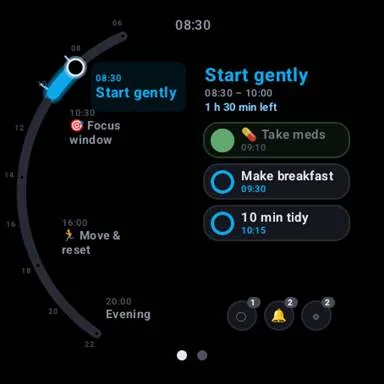
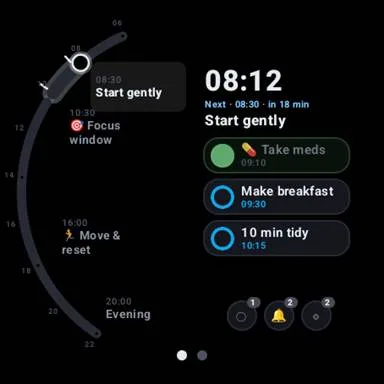
The day at a glance
Open Kronoflow on the watch and you land on Flow: the current block, how long it has left, the next block, and the actions inside the current one. Tap an action to complete it. Actions that ask for confirmation on the phone ask for a second tap on the watch too.
Tile and complication
Add the Kronoflow tile for a one-swipe view of the current block, or put the complication on your watch face so the block name is always there without opening anything.
Priorities on the wrist
The Matrix screen shows your four priority quadrants. Open one to see its items in a centred list and tap them off as you go.
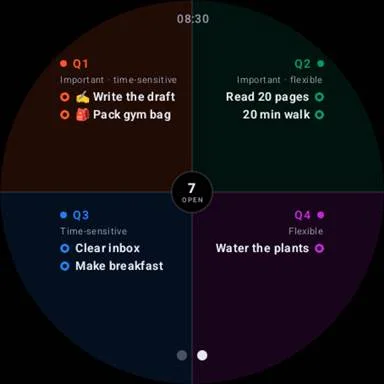
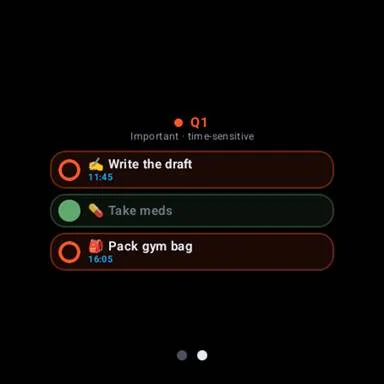
Follows the phone, without draining the battery
Change a block on the phone (start it later, stretch it, move a task) and the watch catches up. The watch does not poll every minute; it wakes at block edges and when the phone sends a change.
Quiet when nothing is planned
When no block is running, the app becomes a large, calm clock instead of an empty list.
Set up from the phone
Look, emoji, text size, whether finished items are hidden and which screen opens first are all chosen in the phone app’s settings, so the watch stays simple to use.
Getting it
Install Kronoflow from Google Play on your phone; on your Wear OS watch, find it in the Play Store under the same name. It is free, with an optional Pro subscription on the phone. See the feature overview for the phone side.